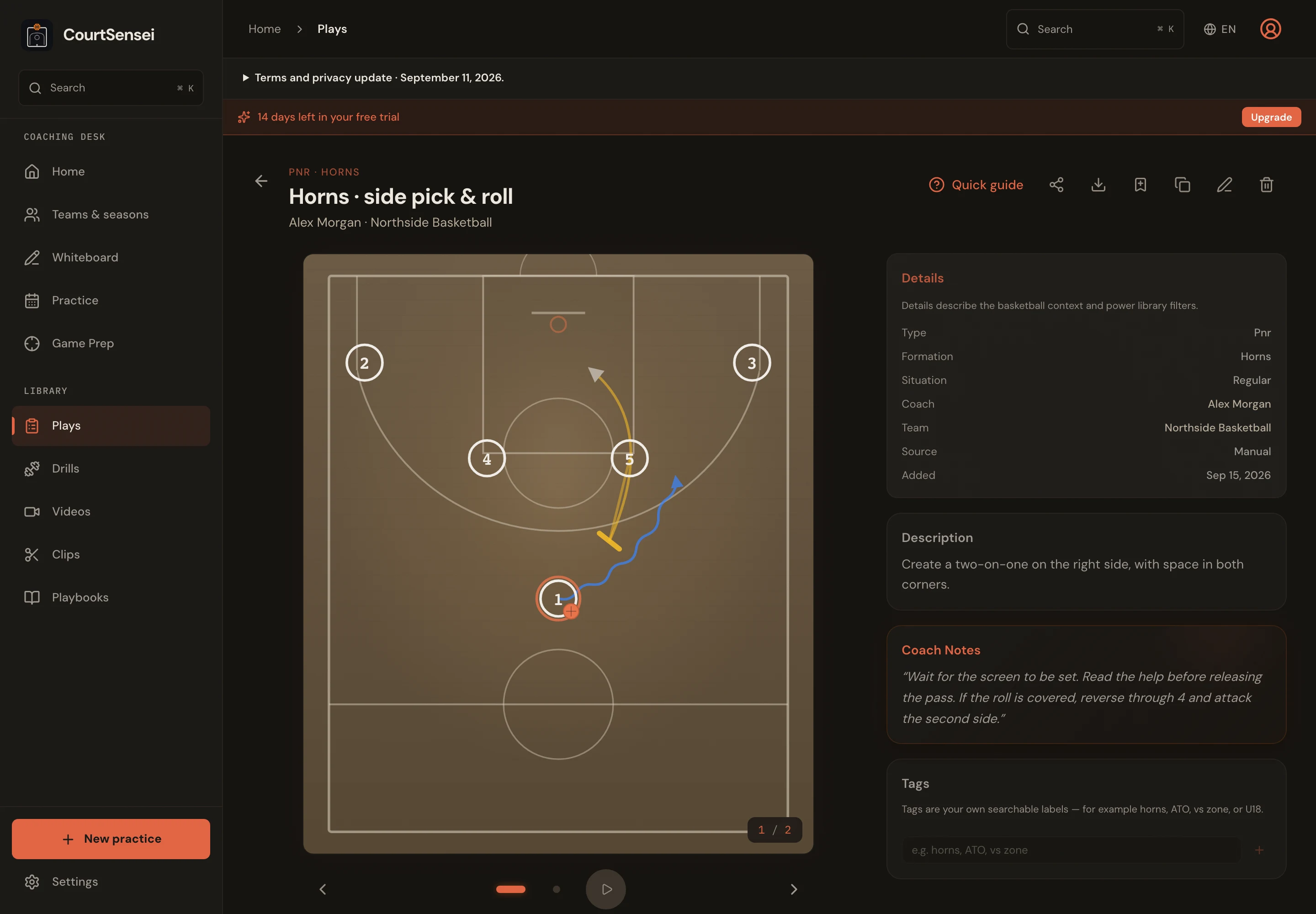
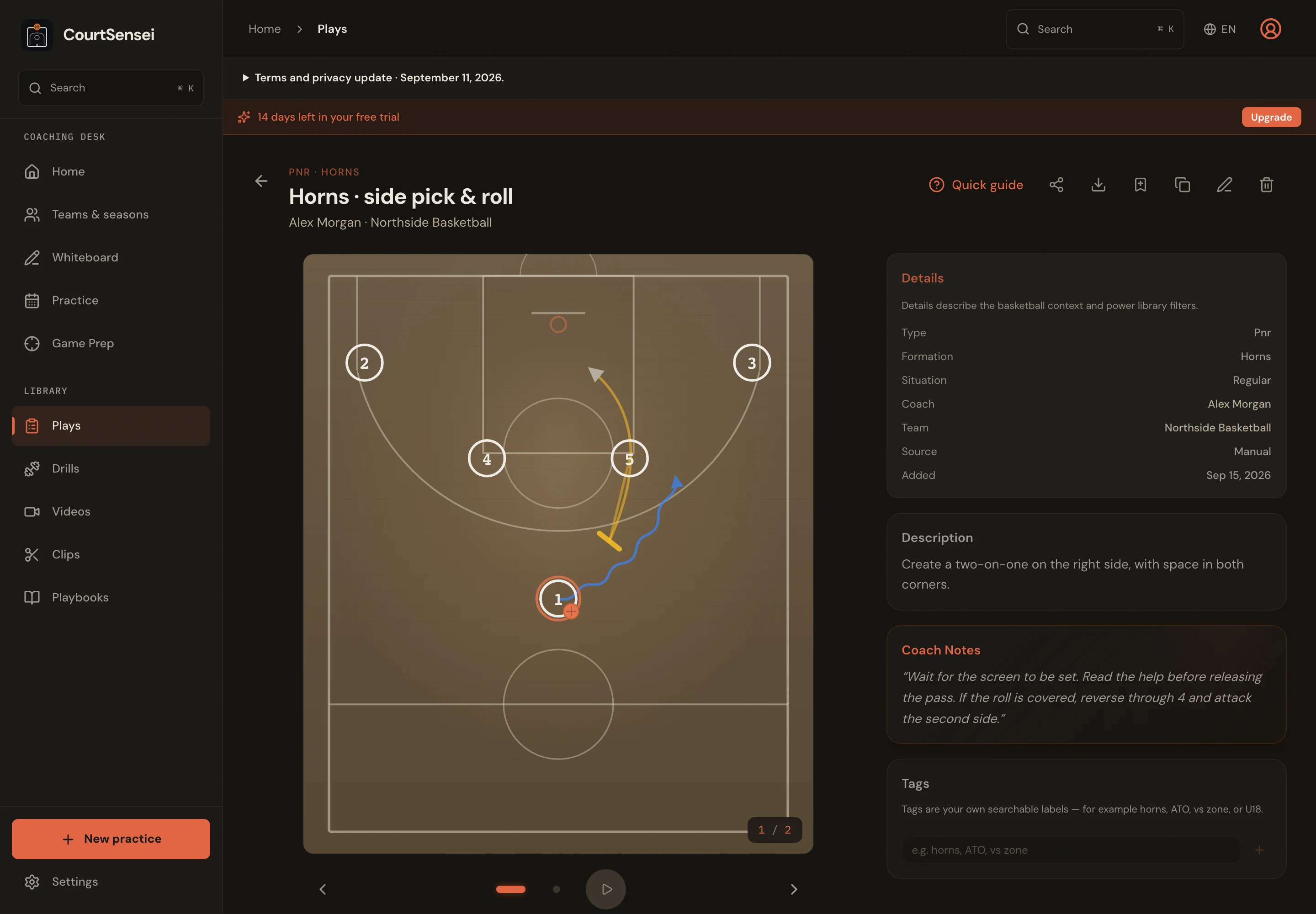
Plays & whiteboard
Draw movements, add attackers and defenders, animate frames or open a blank court during a timeout.
FOR BASKETBALL COACHES
Draw the action, prepare practice, study your opponent and track the game. Keep the work connected to your team and season.
14-day free trial · no card · exports as PDF
Explore drawing plays, planning practice, working with video and preparing opponent reports.
CourtSensei
One coaching workspace, with your team and season as the starting point.
Draw movements, add attackers and defenders, animate frames or open a blank court during a timeout.
Reuse saved exercises, link diagrams to timed blocks and take a printable plan to the court.
Keep rosters, attendance and player notes with the right team, even when you coach several squads.
Record events, manage your five on court and track total minutes and consecutive playing time.
See makes and misses by player or across the team, with jersey numbers and PDF export.
Cut clips and organise them by action, outcome or player. Share a focused playlist with the team.
Combine opponent players, photos, statistics, highlighted fields and coaching notes in a report.
Export playbooks, practice plans and reports as PDFs, or share links with players and staff.
Open the half-court, drop the five. Frame by frame, sketch the motion — screens, cuts, reads, the way you actually coach it. Tag it BLOB, Argentina, low-clock. It's now in the library forever.
Scrub last November's win. Find the exact possession where that BLOB worked. Cut it, tag it, attach it to the play. Now the diagram and the evidence live on the same page — forever tied together.
Friday morning. Pull the scout together: 39 plays by situation, opponent clips already waiting, matchup cards, coverage notes. One tap — PDF on the locker-room table. Monday's practice plan writes itself from what you just installed.
Everything stays connected. The play remembers its clip. The clip remembers its game. The scout remembers its plays. Nothing starts from zero again.
A look inside the dashboard — plays, drills, film and prep all in one library, one keystroke apart.
Last 24 hours · sorted by use
Open a complete PDF exported from CourtSensei. Fictional coaching data, in English. A4 format, no sign-in required.

Two pro players. One built a career studying the best coaches in Europe from the point-guard seat. The other anchored the paint across eight ACB seasons. Between them — fifteen years of watching scouts, playbooks and film the way players actually receive them, and keeping the same thought on a loop: this should live in one place.
170+ EuroLeague games over a decade across Partizan, Žalgiris, CSKA, Fenerbahçe and FC Barcelona. Played for some of the best coaches in Europe — Šarūnas Jasikevičius, Željko Obradović — and kept a running notebook of what he was learning from them: plays, practice structures, reads, habits. He wanted one app where all of it lived together. That was the starting idea. What it grew into is what you see now — a full working tool for head coaches and assistants: plays, drills, film, scouting, practice planning, the whole program in one place.
Eight seasons in the Spanish ACB with San Pablo Burgos and Bilbao Basket, plus a run in the German BBL with Mitteldeutscher, then Obradoiro and Básquet Coruña. Won the 2019–20 Basketball Champions League with Burgos. Sat on the receiving end of every kind of scouting report a coach has ever handed out. When Léo brought the idea, it was obvious: build the tool we both wished our staffs had — and get it into their hands.
Every play we drew for a coach, every scout we studied, every film session we sat through — we kept asking the same question: why isn't this in one place yet? So we built it.
Draw a play, plan a practice, cut a clip and build a scouting report with the actual product before deciding.
Export coach-ready plays, practice plans and scouting material when paper is still the fastest tool on court.
Open CourtSensei in a modern browser and keep the same coaching workspace available across your laptop and tablet.
Six things every coach wants to know before trusting a new tool with their season.
Still stuck? contact@courtsensei.com
Yes. Drag in video files (MP4, MOV, HEVC) or paste YouTube / Vimeo links — CourtSensei indexes them instantly. Upload directly from your device or point to a cloud URL.
Plays are drawn in our editor with frame-by-frame animation — recreate your existing playbook in a fraction of the time it took to whiteboard it.
The CourtSensei web workspace is an installable web app, so you can add it to your home screen and open it like an app. The private coaching workspace currently requires an internet connection; full offline editing is on our roadmap.
Private by default. People with a sharing link can see the content you choose to share. Everything is encrypted in transit and at rest. We don't train models on your video and we don't share scouting with other clubs — ever.
Cancel anytime. Access ends after your paid period, but your data remains stored so you can reopen the workspace when you resubscribe. Export scouting reports as PDF before access ends. It's your season, not ours.
Most coaches run their first practice plan out of CourtSensei within a week. Draw your first play on day one, tag two games on day two, and the rest is muscle memory. The interface is designed for coaches, not IT departments.
Yes. Share plays, practice plans, clip playlists and live game statistics with a link. Players and assistants can open the shared view in their browser without creating an account.
You choose what to share. Your coaching workspace and private player notes stay private.
14-day free trial — no card required. Build your playbook, upload film, plan practice with everything unlocked. After the trial it's €69 / month or €690 / year (2 months free). If you do not subscribe, workspace access locks while your data remains stored.
Pro clubs and federations: contact@courtsensei.com — we'll tailor it.
Coaching staffs typically pay €200–400 per month for separate drawing, video and scouting tools. CourtSensei bundles them into one modern platform — built for the way coaches actually work.

